OnBoard
How can we make planning for a trip fun & interactive?
Our team had an extensive brainstorming session to develop our new idea, OnBoard. We used piggyback prototyping by using the website Padlet to prototype our idea. We created a moodboard on Padlet, simulating the functionality and features of OnBoard. Essentially, users can upload their own posts, including images, videos, and links to other websites. They can also interact with others by commenting, liking, and disliking posts. This simulates social interaction and allows for a collaborative and organized way to brainstorm ideas of places and activities to do on a trip.
What We
Changed
-
Binary voting & limited choosing selections → more freedom to choose activities and input own choices rather than having pre-set choices
-
Lack of social interaction → interactive comment section to reply to others' posts, upvoting, downvoting
-
Awkward interactions by matching up groups → made sure that people understood that they are a group of friends
-
No final product showing itinerary → showed the final moodboard of everyone’s ideas

Steps
Our prototype aims to address the pain points from the first prototyping session, mainly by increasing social interaction. Here are the steps our audience took to participate in our prototype:

Step 1: Setting the Scene
Audience imagines they're a group of friends planning a trip to Tokyo.

Step 2: Creating Posts
Participants had 4 minutes to upload their posts.

Step 3: Interact with posts
Participants had 4 minutes to upvote, downvote, and comment on posts.

Step 4: Presenting final product
Discussed which posts got the most upvotes, most replies, most downvotes, etc.

Step 5: Post-Session Survey
Filled out short survey to gauge general opinions.
prototype
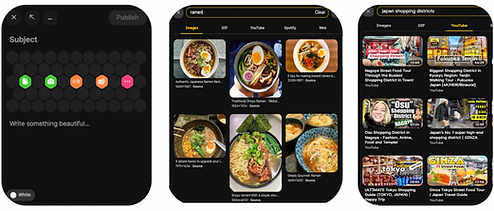
These imagines show Padlet's uploading and search engine features that simulate OnBoard's design.
Screenshots
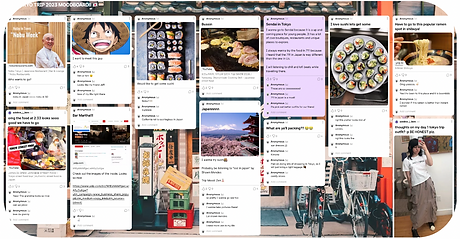
Final moodboard with everyone's posts and comments.
Feedback
What participants liked:
-
Being able to view other’s posts helped people better prepare for their trip
-
Gave ideas of things to post
-
Finding common interests
-
Easy to keep track of everyone’s ideas
-
-
Enjoyed interactive aspects
-
Liked being able to post visuals and external links

What participants disliked:
-
Uploading post schematics was a bit confusing and not user-friendly
-
Didn’t like the upvoting/downvoting feature -> created popularity system

Key Insights & Improvements

1
Strengths
-
Allowed for easy collaboration through using visuals
-
Facilitated more social interaction through comments - replying to posts
-
Gave users more freedom to provide their own ideas regarding activities - compared to p1 where they were given 2 choices to choose from
2
Weaknesses
-
upvoting and downvoting create a popularity system
-
may be unfair towards posts that don't get any interactions
-
-
room for more complex social interactions
3
improvements
-
Consider adding reaction features (emojis) to prevent the popularity system
-
Implement a notification system to inform users about what has been added to the moodboard
-
More organized and user-friendly platform
-
Focus on ways to implement more social interaction features
-
gamifying process to increase participation and create incentive